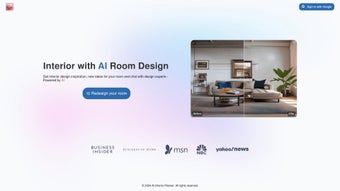

Download AI Interior Planner – AI‑Powered Room Design, Free & Secure
Overview
AI Interior Planner is a cutting‑edge, cloud‑driven design assistant that transforms ordinary photos of any room into professionally rendered interior concepts in just seconds. By combining the latest advances in artificial intelligence with time‑tested interior‑design principles, the tool empowers homeowners, renters, interior‑design hobbyists, and even small‑scale professionals to visualise fresh layouts, colour palettes, furniture arrangements, and décor ideas without the need to hire an expensive designer. The workflow is intentionally simple yet powerful: snap a clear, well‑lit picture of your living room, bedroom, kitchen, or any space, upload it to the web app, and let the AI analyse dimensions, lighting, existing furniture, and architectural features.
Within 30‑60 seconds you receive a photorealistic 3‑D render that suggests new furniture placements, colour schemes, lighting fixtures, and decorative accents tailored to the style you love—whether that’s modern minimalism, rustic farmhouse, bold mid‑century modern, or a completely custom aesthetic. In addition to static renders, AI Interior Planner offers a live‑chat interface where the AI acts like a personal design consultant. You can ask for budget‑friendly alternatives, request a cozier vibe, or explore how a different wall colour would affect ambience.
The chat replies with actionable tips, product links, and even a step‑by‑step plan to bring the virtual design into reality. Because the platform is fully cloud‑based, updates roll out automatically, ensuring you always have the latest design trends and AI improvements without manual patches. Whether you’re redesigning a single accent wall or overhauling an entire home, AI Interior Planner delivers a fast, user‑friendly, and secure way to experiment with design ideas before committing to any purchase.
Key Features & How It Works
- Instant Photo Analysis: Upload any JPEG or PNG of your room; the AI evaluates size, window placement, natural light, and existing furniture to create a baseline model.
- AI‑Generated 3‑D Renderings: Receive high‑resolution, photorealistic visualisations with suggested furniture, flooring, wall finishes, and accessories.
- Style‑Based Recommendations: Choose from pre‑set design styles (Modern, Scandinavian, Industrial, etc.) or describe a custom aesthetic for tailored suggestions.
- Interactive Design Chat: Ask the AI for budget‑friendly swaps, colour variations, or how to maximise storage; the chat returns concise, actionable advice.
- Product Integration: Direct links to popular retailers (Amazon, Wayfair, IKEA) let you purchase recommended items with one click.
- Version History & Export: Save multiple design iterations, compare them side‑by‑side, and export PNG, PDF, or GLB files for AR/VR preview.
- Secure Cloud Storage: All uploads are encrypted in transit and at rest; designs are stored on GDPR‑compliant servers.
- Regular AI Updates: The platform auto‑updates its design algorithms and trend database, ensuring you always receive contemporary suggestions.
Why AI Improves the Design Process
The traditional interior‑design workflow often involves multiple site visits, mood boards, and endless revisions that can stretch over weeks. AI Interior Planner condenses that timeline into minutes by automating the spatial analysis that human designers spend hours performing. The neural network has been trained on millions of real‑world interiors, allowing it to recognise optimal furniture scale, colour harmony, and lighting balance.
Moreover, the AI can simulate how different times of day affect ambience, helping you choose window treatments or lamp placements that work from sunrise to sunset. The chat function further personalises the experience; it remembers your preferences throughout the session, offering continuity that feels like you’re speaking with a dedicated designer rather than a static algorithm. This combination of speed, accuracy, and personal touch makes the tool especially valuable for users who lack formal design training but still want high‑quality results.
Installation, Usage & Compatibility
AI Interior Planner is primarily a web‑based application, which means there is no heavy software download required for most users. However, a lightweight desktop wrapper is available for Windows, macOS, and Linux for those who prefer a native experience. The installation steps are straightforward and can be completed in under five minutes:
- Visit the official AI Interior Planner website and click “Download App” (optional for desktop users).
- Run the installer (Windows .exe, macOS .dmg, or Linux .AppImage) and follow the on‑screen prompts. The installer verifies the digital signature to ensure a secure, tamper‑free package.
- Launch the application or open the web portal in any modern browser (Chrome, Edge, Firefox, Safari).
- Create a free account using your email or social login. Account creation enables you to save designs, access the chat history, and receive update notifications.
- Upload a clear, well‑lit photo of the room you wish to redesign. The AI recommends a cropping rectangle if the image contains unnecessary background.
- Select a design style or type a custom description, then click “Generate Design”. Within 30‑60 seconds the AI produces a render and opens the chat window for further refinement.
Supported Operating Systems:
- Windows 10 and later (64‑bit)
- macOS 11 (Big Sur) and later
- Linux distributions with glibc 2.28+ (AppImage)
- iOS 13+ (iPad & iPhone) – native app available in the App Store
- Android 8.0+ – native app available on Google Play
The web version works on any device with a modern browser, making it ideal for quick design checks on tablets or smartphones while you’re on‑the‑go. Minimum system requirements are modest: 2 GB RAM, 500 MB free disk space, and a stable internet connection (minimum 3 Mbps) for optimal AI processing speed. Because all heavy computations happen in the cloud, even older hardware can enjoy high‑quality renders without lag. Security‑conscious users will appreciate that every upload is encrypted with TLS 1.3 during transit and stored using AES‑256 encryption, with images automatically purged after 30 days unless saved to a user account.
Pros, Cons, FAQ & Conclusion
Pros
- Fast, AI‑driven design generation saves time and money.
- User‑friendly interface; no design background needed.
- Extensive style library and custom style input.
- Integrated chat provides real‑time, personalised advice.
- Secure cloud storage and GDPR compliance.
- Cross‑platform availability (Windows, macOS, Linux, iOS, Android, web).
- Free tier for basic renders; premium plan adds high‑res exports and unlimited saves.
Cons
- AI may misinterpret highly cluttered photos; best results with clean images.
- Premium features (high‑resolution export, AR preview) require a subscription.
- Limited offline functionality; core AI processing needs internet.
- Product links are affiliate‑based, which may influence recommendation bias.
FAQ
Can I use AI Interior Planner for commercial projects?
Yes, the platform offers a Business License that permits commercial use, bulk uploads, and team collaboration features. Contact support for pricing details.
How secure is my uploaded photo?
All uploads are encrypted with TLS 1.3 during transfer and stored using AES‑256 encryption. Images are automatically deleted from the server after 30 days unless you save the design to your account.
Do I need a powerful computer to run the desktop app?
No. The heavy AI calculations are performed in the cloud, so the desktop client mainly handles UI rendering. Even modest laptops meet the minimum 2 GB RAM requirement.
Can I export designs for use in other 3‑D software?
Premium users can export a GLB file, which is compatible with most 3‑D modelling tools such as Blender, SketchUp, and Unity. Free users receive PNG and PDF exports.
Is there a free trial for the premium plan?
Yes, a 7‑day free trial gives you access to all premium features, including high‑resolution renders, unlimited saves, and AR preview. No credit card is required to start the trial.
Conclusion & Call to Action
AI Interior Planner bridges the gap between professional interior design and DIY home improvement by delivering fast, accurate, and visually stunning room concepts at a fraction of the traditional cost. Its blend of AI‑generated renders, an intuitive chat assistant, and seamless cross‑platform availability makes it a valuable tool for anyone who wants to experiment with colour, layout, and décor without the guesswork. While the free tier provides enough power for casual users, the premium subscription unlocks high‑resolution exports and advanced AR features that are perfect for serious remodelers or design professionals. If you’re ready to visualise your dream space, revamp a tired room, or simply explore new style ideas, click the button below to start your free trial today. Transform your home with the confidence of a seasoned designer—no appointments, no hefty fees, just intelligent, secure, and instantly actionable design insights.



.png)



